
Think about your routine this morning. You woke up, picked up your phone, tapped an app to buy a coffee, streamed music on your drive, glanced at your bank account, and maybe adjusted a smart thermostat from your desk.Within two hours of waking up, you interacted with dozens of remote computers around the world. You handed out your location, your credit card number, and your personal credentials without giving it a second thought.The only reason your life doesn’t turn into a complete nightmare every time you tap your screen is because of an invisible layer of defense running silently in the background. That layer is cybersecurity.
And despite what tech influencers or corporate consultants want you to believe, cybersecurity isn’t rocket science. It isn’t a dark room with green code scrolling down a monitor while someone types at lightning speed. It’s really just basic home security applied to computers: figuring out what’s valuable, spotting where the locks are flimsy, and putting sensible barriers in place so you aren’t an easy target.
Why Is Securing Computers So Hard in the First Place?

To understand how hackers break into things, you first have to understand why software breaks.
Computers are extraordinarily fast, but they are also remarkably dumb. They follow instructions with literal, mindless obedience. When a developer writes a mobile app, they write code based on how they expect a normal human being to behave. They put a box on the screen and say, “Type your 10-digit phone number here.” In cybersecurity, understanding how computers follow these instructions is essential to identifying and preventing security vulnerabilities.
A hacker is simply someone who looks at that text box and asks a weird question: “What happens if I paste 5,000 lines of junk computer code into this phone number box instead?”
If the developer didn’t anticipate that bizarre input, the app gets confused. It panics, crashes, or—in the worst-case scenario—accidentally dumps a file full of private customer records right onto the screen.
That exact gap—between how a system was supposed to work and how it can be tricked into behaving—is where every single cyber attack happens.
The Big Difference: InfoSec vs. Cybersecurity
People use these two terms like they mean the same thing, but they don’t.
Information Security (or InfoSec) is the big umbrella. It’s the practice of keeping data safe no matter where or how it lives. If you have physical tax documents locked inside a metal filing cabinet in your office, that’s InfoSec. If you have medical files stored on a cloud drive, that’s also InfoSec.
Cybersecurity is just one specific slice of InfoSec. It deals strictly with digital systems—your phone, your laptop, home Wi-Fi routers, cloud apps, and online profiles. If electricity flows through it or it connects to the internet, defending it falls under cybersecurity.
The Three Rules Every Security Person Lives By
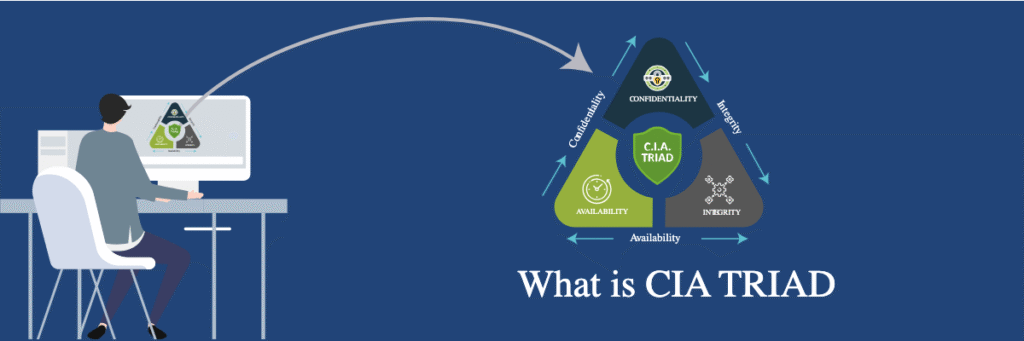
If you sit down with anyone who works in tech defense, every rule they set up—from forcing you to change passwords to blocking certain websites at work—comes down to protecting three simple things. In the tech industry, they call this the CIA Triad:
- Confidentiality (Keeping secrets secret): This means private stuff stays private. When you check your bank balance over coffee shop Wi-Fi, encryption makes sure those numbers show up on your screen, while remaining completely invisible to anyone else sharing that network.
- Integrity (Making sure data isn’t tampered with): This is about trust and accuracy. Imagine a digital database at a local pharmacy. If a system bug or a hacker silently changes a patient’s prescription from 5 milligrams to 500 milligrams, that data lost its integrity. It doesn’t matter if the file stayed private—it’s now dangerous.
- Availability (Keeping things working when you need them): A system can be totally private and completely untampered with, but if it crashes right when you try to open it, it’s useless. If your bank’s servers go down on payday, that’s a failure of availability.
Anatomy of a Break-In: Flaws, Ladders, and Damage
In movies, hacking looks like magic. In real life, it’s a very mundane, three-step chain of events in cybersecurity:
First, there’s a vulnerability. This is the flaw or oversight in the system. Think of it as an unlocked ground-floor window that the homeowner forgot about.
Second, there’s the exploit. This is the specific tool, script, or trick built to take advantage of that flaw. Think of it as the ladder the burglar brought along to reach that unlocked window.
Third, there’s the payload. This is the actual damage done once inside—whether that’s stealing passwords, copying your family photos, or locking up your computer and demanding cash to unlock it. Understanding this chain is a fundamental part of cybersecurity.
What on Earth Is a “Zero-Day”?
You’ve probably heard this term in the news. A “Zero-Day” vulnerability is simply a security bug that a hacker discovered before the developers who wrote the software even knew it existed.
It gets its name because the software company has had zero days to release a fix or patch. These are dangerous because until the company realizes what’s happening and pushes an emergency update, every single machine running that software is wide open.
The Human Factor: Why Firewalls Fail
You can spend millions of dollars on military-grade firewalls, top-tier security software, and elite engineers. But none of that matters if an employee hands over their password to a smooth talker over the phone.
This is called Social Engineering—hacking human psychology instead of computer code. Attackers don’t bother cracking complex encryption if they can just manipulate basic human nature like trust, fear, urgency, or the desire to be helpful.
A classic example? An attacker calls an office receptionist pretending to be “Dave from IT.” They sound panicked, claim a core server is about to crash, and convince the employee to read off their login code to “save the system.”
The same logic applies to Physical Security. If a stranger can walk past the front desk and stroll right into a server closet, software defenses don’t matter anymore. They can plug a malicious USB stick directly into a computer or physically walk out with hard drives under their arm.
5 Practical Habits That Block Almost Every Attack
Here’s a secret from the security world: most cybercriminals aren’t targeting you specifically. They run automated scripts that scan thousands of computers at once, looking for easy targets. If you make yourself even slightly inconvenient to hack, they will give up and move on to someone else.
Here are the five simplest ways to protect yourself:
- Stop reusing passwords. This is the single biggest mistake people make. If a random shopping site gets breached and you used that same password for your main email, the hackers now hold the keys to your entire life. Get a simple password manager app to generate and save long, unique passwords for you.
- Turn on two-step verification (MFA). Enable those prompts that ping your phone or ask for an authenticator code when you log in. Even if a bad actor manages to steal your password online, they still can’t break in without physical access to your phone.
- Don’t ignore update notifications. When your phone or laptop nags you to restart and update, just do it. Those updates aren’t just adding new emojis; they are closing digital locks that hackers recently figured out how to pick.
- Slow down when looking at emails and texts. If a message creates a sudden sense of panic—“Your account will be terminated in 15 minutes!”—take a breath. That artificial panic is specifically engineered to make you click a dangerous link without thinking.
- Keep an offline backup. Keep copies of your important documents and irreplaceable photos on an external hard drive stored in a drawer, or backed up to a secure cloud service. If your computer ever gets hit with ransomware or completely dies, you can just wipe it clean without losing your life’s work.
Thinking About a Career in Security?
If you’re reading this because you want to get into the tech industry, cybersecurity is one of the most practical fields you can enter. Every company—from hospitals and banks to logistics firms and retail chains—runs on connected systems, meaning everyone needs defenders.
When starting out, people usually land in one of a few core roles:
- Security Analyst: The digital detectives. They monitor network traffic, investigate system alerts, and react when strange activity pops up.
- Network Security Specialist: They focus on building the perimeter—setting up firewalls, secure VPNs, and routers to keep bad traffic out.
- Application Security Engineer: They work side-by-side with software developers, reading source code and catching bugs before an app goes live.
- Incident Responder: The digital firefighters. When a company actually gets breached, these are the specialists who jump in to contain the damage, kick the attackers out, and clean up the mess.
If you want to step into this world, skip the fancy coding bootcamps for a minute. Start by learning how basic computer networking functions—how devices talk to each other, what IP addresses are, and how data travels across the internet. Grab a beginner study guide like CompTIA Security+, set up a few free virtual machines on your computer to experiment with, and start testing things out yourself.
Frequently Asked Questions
: Do I really need a password manager, or can I just write them down?
A physical notebook in your house is actually safer than reusing the same password online. But a password manager is far easier—it generates long, impossible-to-guess passwords and fills them in automatically.
Q: Can my phone or Mac actually get a virus?
Yes, absolutely. While iPhones and Macs have strict built-in security, they aren’t invincible; malicious apps, dangerous links, and phishing scams can infect any device if you aren’t careful.
Q: Is public Wi-Fi really that dangerous to use?
It can be, because anyone on the same open network can potentially intercept unencrypted traffic. Avoid logging into your bank or typing sensitive passcodes unless you are connected to a trusted VPN.
Q: What should I do first if I accidentally click a suspicious link?
Disconnect your device from Wi-Fi immediately to cut off any active connections. Then, run a full scan with reputable security software and change your critical account passwords from a different device.
Q: Do I need a tech degree to get an entry-level job in cybersecurity?
Not at all. Most employers care far more about practical hands-on skills, basic networking knowledge, and entry-level certifications like CompTIA Security+ than a formal four-year computer science degree.